Release locked files.
Get back to work.
NoOccupy finds the process holding a file or folder, then ends it — so you can delete, move, or rename without digging through Task Manager.
One-time purchase · 2 computers · 1 year of license updates
The Windows installer is free to download. A paid, machine-bound offline license is required to use the app; activate on up to 2 computers without an account or an online check.
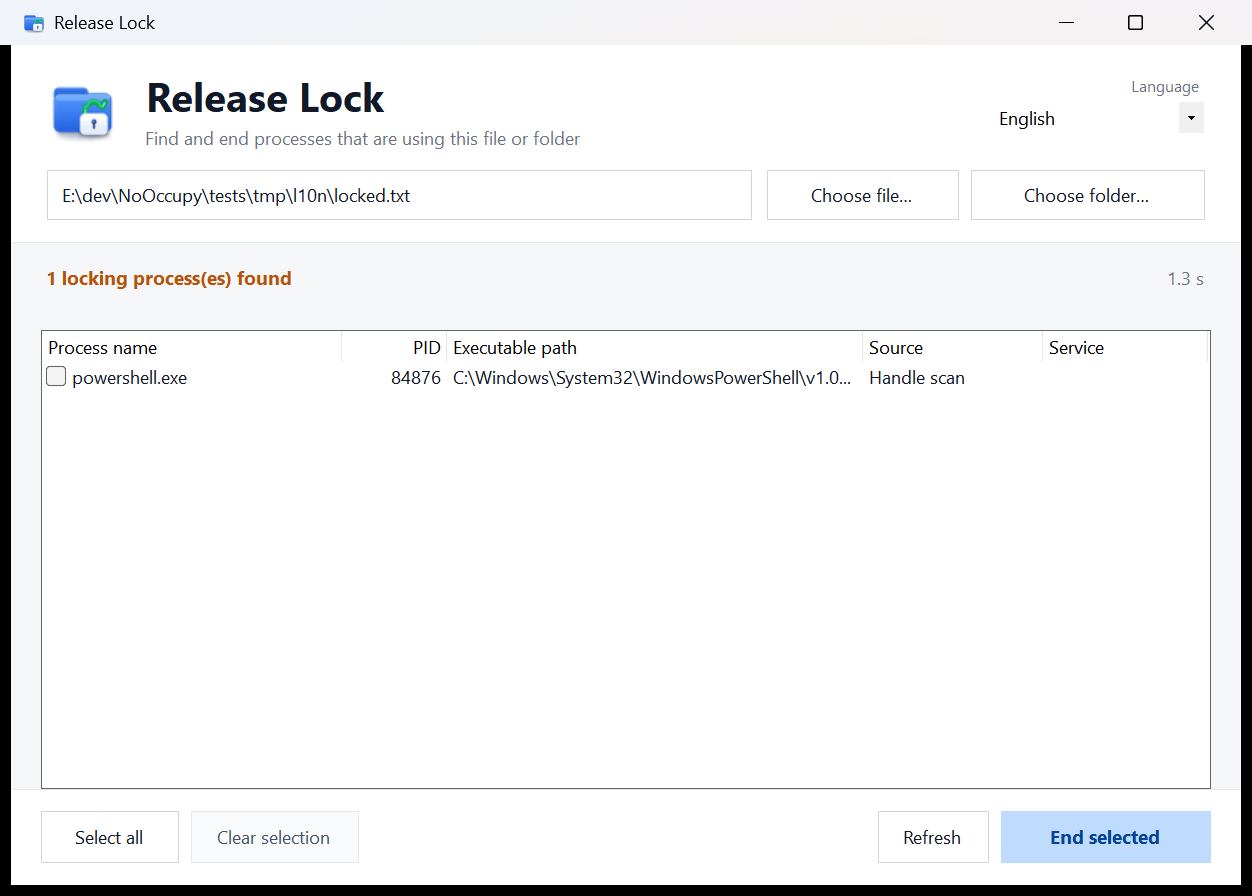
NoOccupy showing exactly which process is locking a file.
What you get
A small, focused tool. No background service, no telemetry.
Find the real culprit
Combines Windows Restart Manager, NT handle scanning and module path scanning to identify every process holding the file.
End only what you choose
Review process name, PID, executable path, detection source and service name. Critical processes are marked and skipped.
Works from Explorer
Right-click a file, folder or folder background and choose Release Lock. Windows 11 users will find it under Show more options.
Four interface languages
English, 简体中文, 日本語 and 한국어, switchable in the app and the installer.
Tiny and private
Around 234 KB, no background service, and no upload of file names. Claiming an activation code is the only network request, and only when you choose it.
Automation ready
The CLI is available today. Your license helps fund future automation work and includes priority support.
What you get with a license
| Feature | Without a license | With a license |
|---|---|---|
| Use NoOccupy (scan / release locks) | — | Included |
| Email support | — | Email, 3 business days |
| Updates and new features | — | Included |
| Offline activation code | — | Instant |
| Computers per license | — | 2 |
| Supports ongoing development | — | Yes |
Simple pricing
One-time purchase, no subscription. A paid license is required to use the app; the installer is free to download. You receive an offline activation code bound to your computer, and activation does not need an account or a network connection.
Secure checkout by Creem. Card payments and local payment methods supported by Creem.
- Full NoOccupy app access
- Instant offline activation code
- 2 computers per license (offline codes)
- Priority email support and 1 year of license updates
- Offline activation — no account or online check
Taxes are calculated at checkout. Creem handles VAT/GST and acts as the merchant of record.
Questions, answered
How is the activation code delivered?
Immediately after payment, the confirmation page asks for the machine code shown in NoOccupy and generates a NOOC offline activation code. Keep the page link or use Find my key with your order email and order number.
What are the computer slots for?
Each order can issue codes for 2 different machines. Open NoOccupy on each computer, copy its machine code, and claim a separate code for that device. Codes are verified offline by the app.
Is this a subscription?
No. It is a one-time license purchase required to use the app. The license includes 1 year of license updates.
Which payment methods are supported?
Creem is the merchant of record and handles checkout, taxes, invoices and refunds. Available methods depend on your country and are shown on the Creem checkout page.
What is your refund policy?
If NoOccupy does not work for you, contact support@yuan-xin.top within 14 days of purchase for a refund. Please include your order number and a short description of the problem.
Does the app send my file names anywhere?
No. Scanning stays on your PC. Claiming a code sends only the machine code (an 8-byte hash plus checksum) and order details to the store. The activation code is then verified locally by NoOccupy; no file names or process lists are uploaded.
Does the app need a network connection to activate?
No. The activation code is verified offline with a public key built into NoOccupy. You only need the network to receive the code; after that you can activate without an account or an online check.
Can I download the installer for free?
Yes. The Windows installer is free to download and you can install it before buying. A paid license is required to activate and use the app after installation.
Download NoOccupy
Windows 10 / 11 · 64-bit · .NET Framework 4.8 · administrator permission required. The installer is free to download; a paid license is required to use the app.